Why run AI locally · Part 3
Can you use AI with no internet connection?
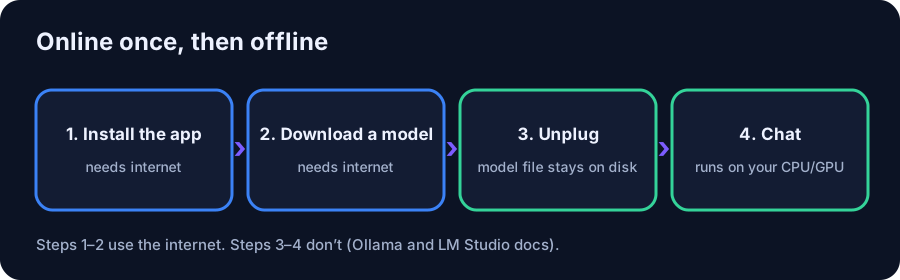
Yes, with a local model. You need the internet once to install the app and download a model; after that, chatting runs entirely on your computer.
We earn from qualifying purchases via affiliate links. Disclosure.
- Cloud chatbots process prompts on the provider’s servers, so no connection means no answers.
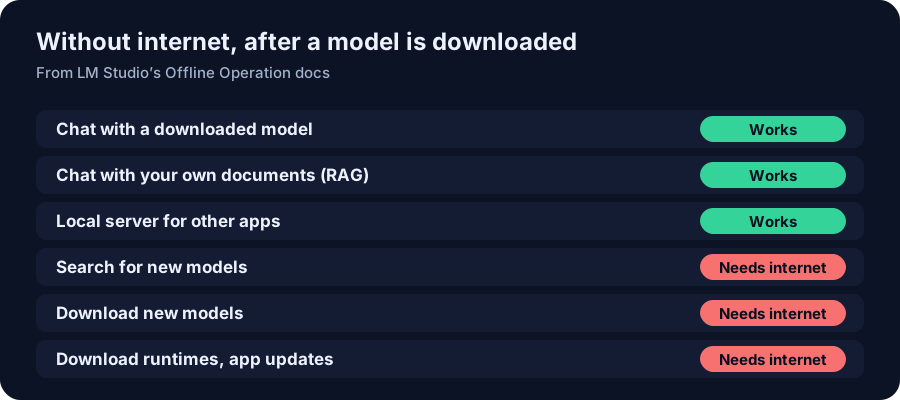
- LM Studio: chatting, document chat (RAG) and the local server work offline (LM Studio docs).
- Searching for and downloading models, runtimes and app updates need a connection (LM Studio docs).
- Ollama stores downloaded models on your drive and serves them from 127.0.0.1 (Ollama FAQ).
Short answer: yes, if the model runs on your own computer. Cloud chatbots such as ChatGPT, Claude and Gemini run on the provider’s servers, so they need a connection. A local app such as LM Studio or Ollama needs the internet only to install and to download a model. LM Studio’s docs say chatting with models, chatting with documents and running a local server don’t need the internet at all.
Why cloud chatbots stop working offline
When you type into ChatGPT, Claude or Gemini, the prompt goes to the company’s servers and the answer comes back over the internet. As Part 1 covered, that’s also why your chats are stored there. No connection, no round trip, no answer. That matters on a plane, at a cabin, during an outage, or anywhere the connection is slow or metered.
What works offline with a local app
LM Studio publishes a page on exactly this. It says the app “can operate entirely offline, just make sure to get some model files first.” Its list of things that don’t need a connection:
- Chatting with downloaded models. “Nothing you enter into LM Studio when chatting with LLMs leaves your device.”
- Chatting with documents (RAG). Documents you drop in stay on your machine and are processed locally.
- Running a local server on localhost or your home network, using OpenAI-style endpoints.
And the things that do need a connection: searching for models, downloading new models, downloading runtimes, and checking for app updates (LM Studio).
How to set it up before you go offline
- Install the app while you’re online: Ollama or LM Studio.
- Download the model. In Ollama,
ollama pull llama3.1:8bdownloads it; in LM Studio, use the Discover tab. Ollama keeps models in~/.ollama/modelson macOS andC:\Users\%username%\.ollama\modelson Windows (Ollama FAQ). - Test it with Wi-Fi off before you rely on it. Run
ollama run llama3.1:8band ask a question. - Turn off cloud features if you want to be sure nothing reaches out: Ollama documents
OLLAMA_NO_CLOUD=1, which also disables its web search.
A local model only knows what it learned in training. It can’t look things up offline, so for current news or prices you still need a connection.
What hardware runs a useful offline model
The model has to fit in memory. Llama 3.1 8B is a 4.9 GB download and fits a 12 GB card like the Arc B580 (Can the Arc B580 run Llama 3.1 8B?) or a 32 GB mini PC. For a stronger model, gpt-oss 20B is 14 GB and fits a 16 GB card (see the fit). A laptop with enough memory works the same way, which is the most practical setup for travel. Check yours with What fits my memory, or see the entry-model guide.
The trade-offs
- Smaller models. What fits on a home PC or laptop is less capable than the top cloud models (see Part 2).
- No live information without a connection, as above.
- Battery. Running a model works the processor hard, so expect a laptop to drain faster. We don’t have measured figures, so we don’t quote any.
Hardware in this article
Minisforum NAB6 Lite, Core i5-12600H, 32GB RAM / 500GB SSD
$607 Minisforum · checked Oct 27, 2026, 1:06 PM CT
Listed as available in the store data. Integrated graphics only: models run from system RAM.
Check price at Minisforum (opens in a new tab)
ASRock Challenger Intel Arc B580 12GB
$329.99 Newegg · checked Oct 27, 2026, about 12:35 PM CT
Sold by Newegg, seen on the product page
Check price at Newegg (opens in a new tab)FAQ
Does ChatGPT work offline?
No. ChatGPT runs on OpenAI’s servers, so it needs an internet connection. To use AI offline, run a model locally with an app such as Ollama or LM Studio.
Does LM Studio need the internet?
Only to search for and download models, runtimes and updates. LM Studio’s docs say chatting with downloaded models, chatting with documents and running a local server work offline.
Where does Ollama store downloaded models?
In ~/.ollama/models on macOS, /usr/share/ollama/.ollama/models on Linux, and C:\Users\%username%\.ollama\models on Windows, per the Ollama FAQ. You can change it with OLLAMA_MODELS.
Can an offline AI model look things up?
No. Without a connection it can only use what it learned in training and any documents you give it locally.